

Published: Updated:
If you receive a Punchbowl invitation for a friend’s event, don’t rush out to buy a new party dress just yet. That festive invite could just be part of a dangerous phishing scam.
_______
A few weeks ago, the first of many strange Punchbowl invitations hit my inbox. If you’re not familiar with Punchbowl, it’s an online platform for sending digital invitations for real-life parties and other events.
Invitation number one was from a family friend whom I hadn’t heard from in quite a while. The next unlikely party invite came from a consumer I helped many years ago. The last one was the most surprising. It came from an email address of someone who is no longer alive.
As a consumer reporter who frequently covers scams, each online invitation screamed “scam alert!” And I was curious. But for the common email user, these phishing expeditions are remarkably successful in luring victims into the trap.
If you find what looks like a Punchbowl or Paperless Post invitation from a friend in your inbox, slow down. Don’t click anything until you have a closer look. You may not be invited to anything — except a phishing scam (no party included).
Here’s what you need to know about how cybercriminals are using festive-looking party invitations to steal your information.

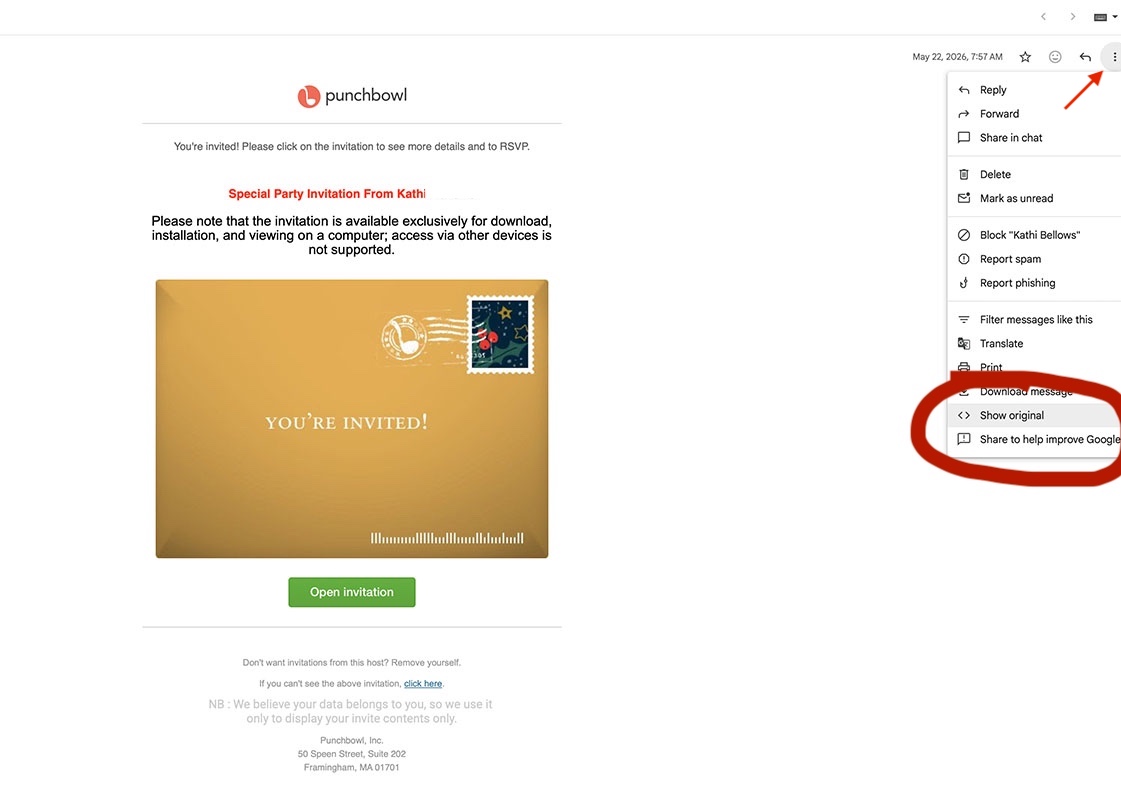
A fake Punchbowl invitation
The first Punchbowl invitation I received waved bright red flags. The subject line was stuffed full of grammatical mistakes and misgendered my friend.

If you’re a regular reader of my column, then you know I’m always ready to investigate a new scam. Looking at the subject line, I thought this should be a good one.
Scammers can make any name they want appear in the address field of an email. So although the email seemed to be from Kathi, I assumed that was spoofed information. But when I checked the email header, it confirmed it had come directly from her Gmail account.
📬 Subscribe to:
Tales from Consumer Advocacy Land
Real stories. Real rescues. Real advice.
Join thousands of smart travelers and savvy consumers who already subscribe to Tales from Consumer Advocacy Land — the friendly weekly newsletter from Michelle Couch-Friedman, founder of Consumer Rescue. It's filled with helpful consumer guidance, insider tips, and links to all of our latest articles.

Protip: If you have a Gmail account you can easily check the actual sender of an email in three steps:
- Open the email (but don’t click anything in the body)
- Click on the three dots in the upper right corner by the reply button.
- In the dropdown box, click “Show original.”
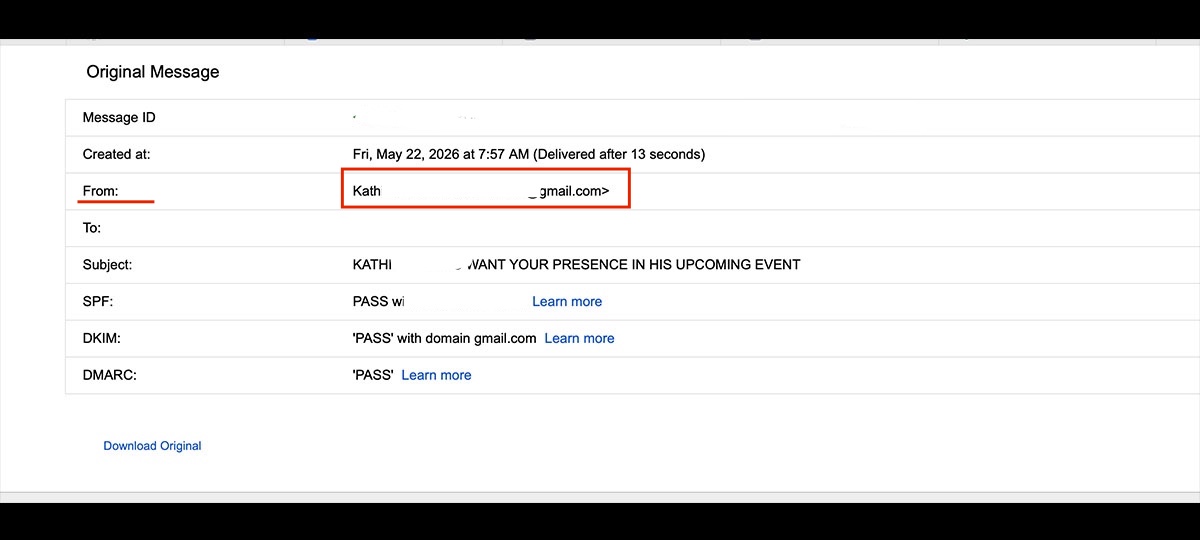
When party hosts use Punchbowl to send invitations, the invite comes directly from the platform.
In this case, the sender field was showing Kathi’s actual email address. That detail proved this was a fake Punchbowl invitation to a nonexistent “Special Party.”
It was also strong evidence that scammers had hacked into Kathi’s email account.
Related: Here’s how my daughter’s $1 donation turned out to be a $2,000 Zelle scam
Safely checking the links in the fake Punchbowl party invitation
I contacted Kathi to give her the bad news that scammers appeared to have hacked her Gmail account. That blind copy line suggested the bad actors sent this invite to a list—likely all her contacts. The longer her contacts believed she had personally sent a Punchbowl invitation to each of them, the greater the chance someone would fall for the scam.
Related: 8 cruise scams passengers need to watch out for now
While Kathi set about sending warnings to her contacts, I returned to the fake invitation.
The original message data doesn’t just tell us where the email came from. It can also reveal who or what is actually behind the buttons on the page without clicking them.
Scrolling down through the data of the original message, I looked for the URL behind the “open invitation” button.
There was the scammer’s phishing site.
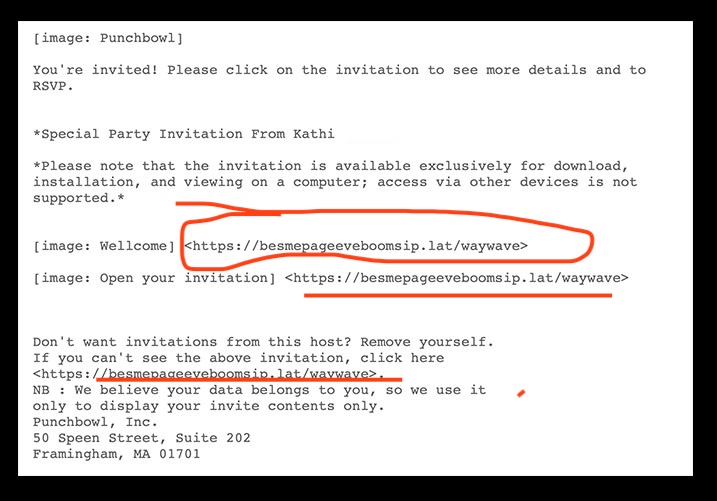
Multiple areas of the invitation contained little traps to redirect the receiver to the scam URL.
Related: Here are the top tourist scams to watch out for in 2026
Here’s what happens if you open the scam invitation
Of course, seeing the bad actor’s URL in the invitation’s code doesn’t tell us exactly how the scam works. So I decided to open the invitation to find out (so you don’t have to).
Not surprisingly, there was no party invite on the other side of that link.
These scammers were particularly sloppy. Although the invitation announcement had been from Punchbowl, when I clicked through, suddenly I was dealing with Paperless Post, a competing online invitation company.
To get to the actual invitation for Kathi’s special event, the instructions said I would need to log in — to one of my real accounts.
These bad actors weren’t particular. They were willing to steal my login credentials from any of a dozen accounts. I just needed to pick one.
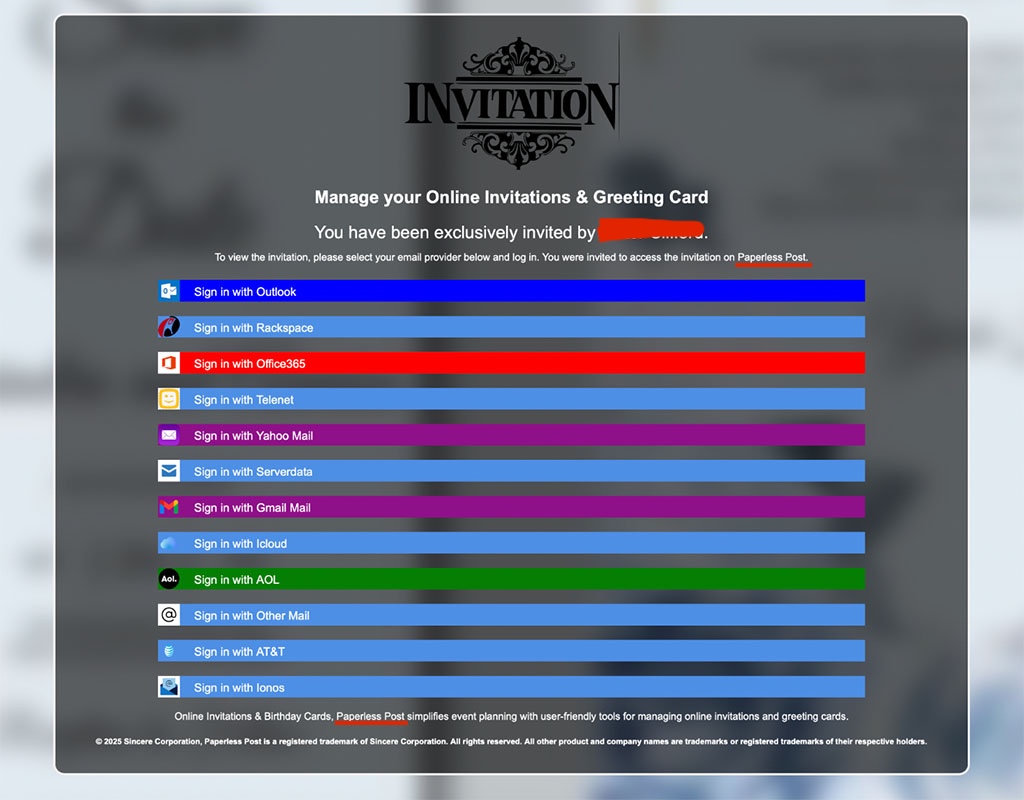
The Punchbowl invitation was sloppily replaced with a Paperless Post invite for the phishing portion of this scam.
It’s not hard to imagine that if an invitee gets this far along, a scam is unlikely to be on their radar. Their friend’s name has lulled them into a false sense of security, and they’re not sensing danger. By now, they’re eager to see when, where, and what they’re invited to attend.
However, the next screen isn’t a true login for any of those services, and there is no invitation. When a victim clicks one of those options, they’re taken to what appears to be the official login page. It isn’t. The sole purpose of that screen is for the scammers to steal their username and password and immediately start scanning for any information they can use to further their bad deeds.
Victims of this scam have had their bank accounts compromised and worse. If the criminals are able to access even one “invitee’s” email account, they can, as an added bonus, send this scam to all the contacts in that account. So one victim can actually spawn hundreds more.
Related: The Publishers Clearing House scam is thriving. Here’s my recorded call to prove it
What to know before you click on a party invitation
1. Legitimate invitations have a time and date
No legitimate Punchbowl or other invitation on the internet should look like clickbait. The invitation should clearly identify who is inviting you and what they’re inviting you to. If you receive an invitation that doesn’t include a time and date, assume it is a scam.
All of the scam invitations I’ve recently received were vague and didn’t mention what kind of party or event I was being invited to. This one invited me to a dinner party at a very precise time of 6:20 p.m., but no particular date. That’s designed to make the invitation irresistible to open to find out.
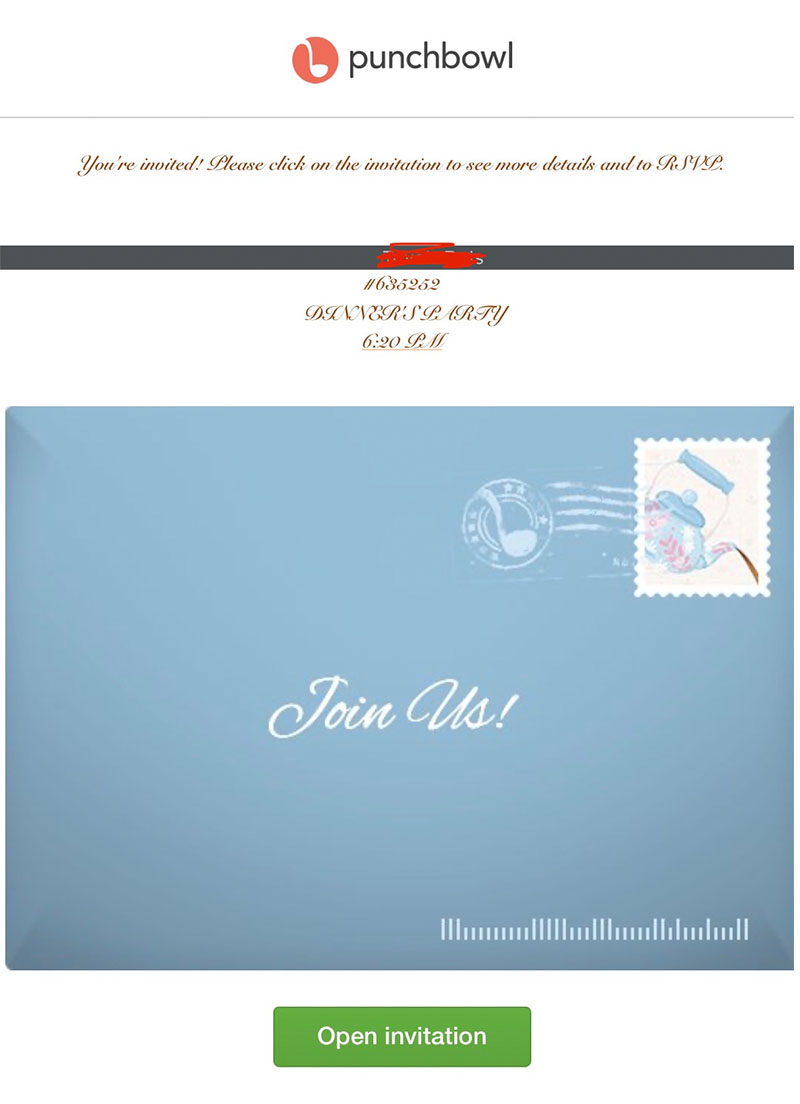
2. Ignore invites with no description of the event
Legitimate online invitation services require the host to provide specific details that are displayed to invitees. An invitation from Punchbowl, Paperless Post, Evite, or any other service that doesn’t clearly describe the event is a red flag.
3. Ask your friend if they’re having an event
If you receive a party invitation you weren’t expecting from a friend, ask them about it. If this friend is not someone that you know well enough to ask, then ignore it.
4. Real invitations from Punchbowl come from that platform
The scammers in this phishing scheme use screenshots and other information from the actual Punchbowl site to make the invitation appear real. But there is nothing legitimate about these party invites.
Legitimate Punchbowl invitations always come from that platform’s domain: Mail@mail.punchbowl.com
If you receive a “Punchbowl” invitation to an event from your friend’s email address, they’ve been hacked, and you’re the target of a phishing scam.
Related: Cruise excursion operator still owes thousands to former customers. So why is she on Airbnb?
The bottom line
To protect yourself against party invitation scams, remember this:
- Don’t impulsively click invitations
- If you do, don’t enter your login information
- When in doubt, you can post your question in the Consumer Rescue: What’s your Problem Facebook group for quick answers.
If your problem is more complicated, send your request through Consumer Rescue’s Rescue Me helpline or send me an email (Michelle@ConsumerRescue.com). Our assistance is always fast, friendly, and, of course, free of charge. (Michelle Couch-Friedman, Chief Fiasco Fixer and founder of Consumer Rescue)
Before you go: Here’s what happened when a scammer stole money from a user’s PayPal account